
· By KAI
Key Takeaways:
- Learn how to access YouTube settings.
- Understand how to manage search history settings.
- Discover steps to stop YouTube from saving history.
Are you concerned about your privacy on YouTube? In this guide, we’ll show you how to stop YouTube from saving your search history with just a few simple taps on your device. For additional helpful articles on safeguarding your online accounts, read how to get your Discord user ID on mobile.
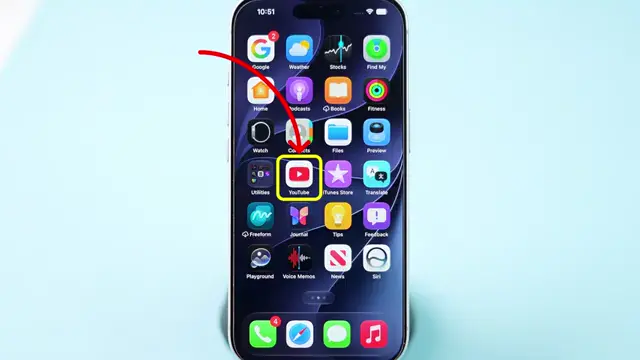
Step 1: Open the YouTube App
Start by opening the YouTube app on your device to access your settings. This will allow you to manage your history effectively.
Step 2: Access Your Profile
Tap on the profile icon located in the bottom right corner of the screen. This will take you to your account settings where you can make changes to your history settings.

Step 3: Go to Settings
Next, tap on the settings icon in the top right corner to access additional options related to your YouTube experience, including the management of your search history.

Step 4: Manage All History
Select ‘Manage All History’ from the settings menu. This option allows you to view and control your search history settings within YouTube.

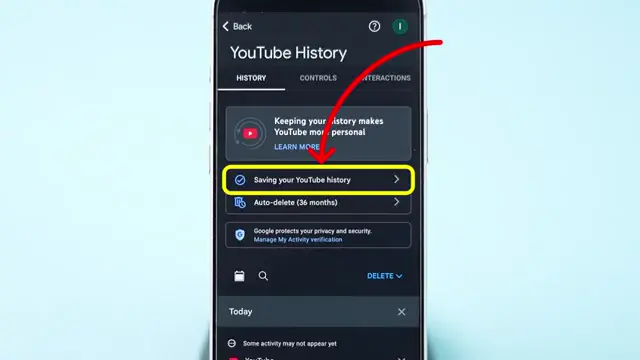
Step 5: Turn Off Search History Saving
Now, tap on ‘Saving your YouTube history’ and then select the ‘Turn Off’ option. This will immediately stop YouTube from saving your search history moving forward.
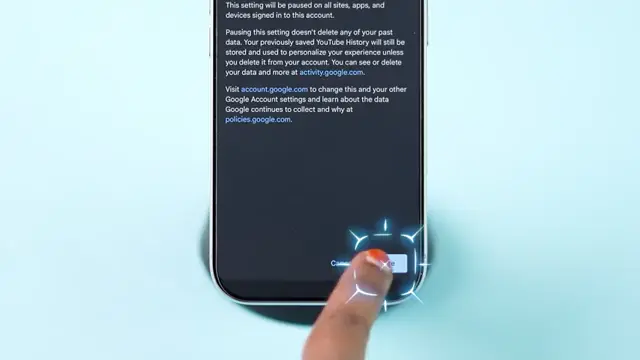
Step 6: Confirmation of Changes
Once you turn off the saving option, you will see a confirmation that your search history will not be stored anymore. This ensures greater privacy in your searches on YouTube.
Does turning off search history affect recommendations?
Yes, turning off YouTube search history can impact your recommendations. Without this history, YouTube’s algorithm has less information to tailor content to your preferences. This may lead to less relevant video suggestions over time. To learn more about managing your privacy on YouTube, explore these essential tips and tricks.
YouTube relies on your viewing and search history to provide personalized recommendations. When you turn off search history, the platform loses a valuable data point, potentially resulting in generic suggestions. It is particularly noticeable if you regularly search for specific genres or channels. Users looking for enhanced privacy may find the trade-off manageable, but those relying on tailored content might miss out.
How to clear YouTube watch history?
Clearing your YouTube watch history is straightforward. You can do this through the app or the website in just a few steps.
To clear history, go to the ‘Library’ tab, select ‘History,’ and tap on the three-dot menu to choose ‘Clear All Watch History’. For more specific control, you can delete individual videos from this list. Keeping your watch history minimal can enhance your experience, especially if you want to reset your recommendations.
- Open the Library tab in the YouTube app.
- Select History.
- Tap the three-dot menu and choose to clear all watch history.
- Confirm the action.
Why does YouTube save search history?
YouTube saves search history to improve user experience through personalized recommendations and algorithmic adjustments. This history helps the platform understand your preferences.
By keeping track of what you search for, YouTube is able to recommend videos that align with your interests, thus enhancing engagement and retention. The data collected aids in refining content suggestions, making it easier for users to discover videos that they may enjoy. While this feature is valuable for users who prefer a customized feed, it raises privacy concerns for those wanting to keep their viewing habits confidential. YouTube offers settings to manage and delete this data as needed.
Frequently Asked Questions
How do I stop YouTube from saving my search history?
To stop YouTube from saving your search history, access the settings through your profile icon and turn off the saving option.
What happens when I turn off YouTube search history?
When you turn off search history, YouTube will no longer save any of your search queries, providing more privacy.
Can I access my YouTube search history after turning it off?
No, after turning off saving your search history, you will not be able to access any saved past searches.
Is it easy to stop YouTube from saving my history?
Yes, it’s a straightforward process that involves just a few taps in the app.
Watch the Video Tutorial
Conclusion
By following these steps, you can easily manage your search history on YouTube and enhance your privacy while using the platform.











Great information shared.. really enjoyed reading this post thank you author for sharing this post .. appreciated