
Target Audience: Beginners | Estimated Read Time: 3 min
Key Takeaways:
- Learn how to access your Google search history settings.
- Discover how to turn off search history effectively.
- Understand the difference between turning off search history and deleting existing activity.
If you want to maintain your privacy while using Google, it’s essential to know how to turn off your search history. This guide will walk you through the steps to stop Google from saving your searches on your Google account.
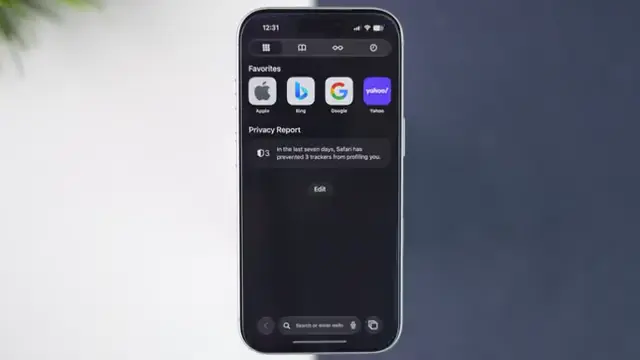
Step 1: Open Google in Your Browser
To begin, launch a browser on your iPhone or computer. Type ‘google.com’ in the search bar and ensure you’re signed in to your Google account to access your settings.
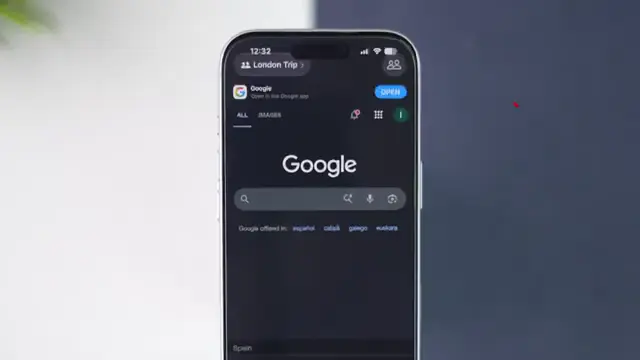
Step 2: Access Your Profile and Search History
Tap your profile icon located in the top right corner. From the dropdown menu, select ‘Search History’ to view your current settings.
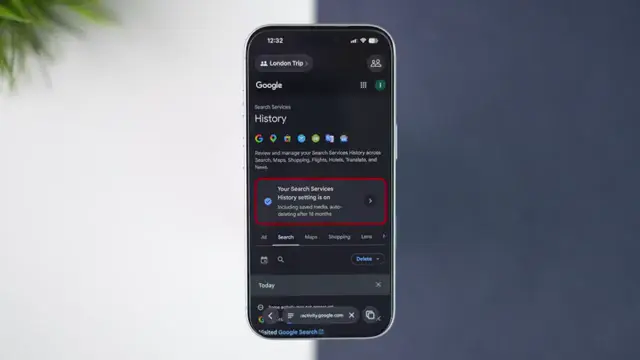
Step 3: Modify Search History Settings
On the search history page, you’ll see that search history is currently on. Tap the small arrow next to it to access history settings and display the options.
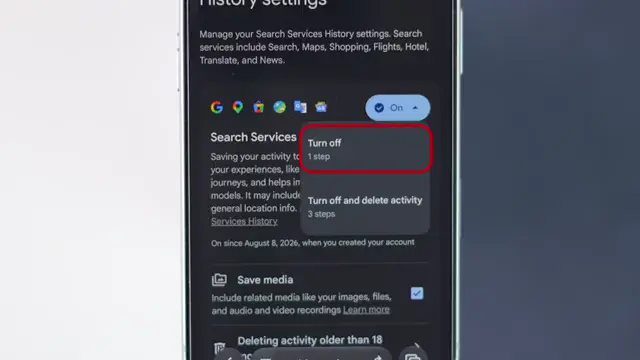
Step 4: Choose to Turn Off Search History
You will be presented with options to either turn off search history while keeping existing activity saved or turning it off and deleting saved searches. Select ‘Turn off’ to stop Google from saving new searches.
Step 5: Confirm Your Changes
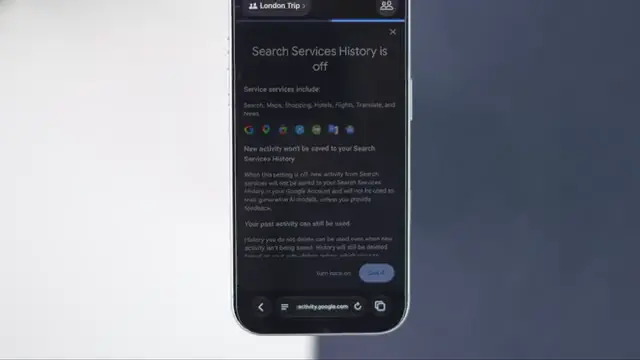
After selecting ‘turn off’, tap ‘Got it’. You’ll see a confirmation letting you know that your existing activity remains untouched. From now on, your Google searches won’t be saved to your Google account.
Frequently Asked Questions
How do I stop Google from saving my search history?
You can stop Google from saving your search history by adjusting your settings in your Google account under ‘Search History’.
Will existing activity be deleted if I turn off search history?
No, you can choose to turn off search history without deleting your existing activity.
Can I turn search history back on later?
Yes, you can easily turn search history back on at any time through your Google account settings.
What happens when I turn off Google search history?
When you turn off Google search history, your new searches will not be saved to your Google account.
Watch the Video Tutorial
Conclusion
By following these steps, you can effectively manage your Google search history and enhance your privacy online. Remember, you can always revisit these settings to make adjustments as needed.
{“@context”:”https://schema.org”,”@graph”:[{“@type”:”HowTo”,”name”:”Turn Off Google Search History Today”,”description”:”Learn how to turn off Google search history quickly and easily to stop Google from saving your searches in your Google account.”,”step”:[{“@type”:”HowToStep”,”position”:1,”name”:”Open Google in Your Browser”,”text”:”To begin, launch a browser on your iPhone or computer. Type ‘google.com’ in the search bar and ensure you’re signed in to your Google account to access your settings.”},{“@type”:”HowToStep”,”position”:2,”name”:”Access Your Profile and Search History”,”text”:”Tap your profile icon located in the top right corner. From the dropdown menu, select ‘Search History’ to view your current settings.”},{“@type”:”HowToStep”,”position”:3,”name”:”Modify Search History Settings”,”text”:”On the search history page, youu2019ll see that search history is currently on. Tap the small arrow next to it to access history settings and display the options.”},{“@type”:”HowToStep”,”position”:4,”name”:”Choose to Turn Off Search History”,”text”:”You will be presented with options to either turn off search history while keeping existing activity saved or turning it off and deleting saved searches. Select ‘Turn off’ to stop Google from saving new searches.”},{“@type”:”HowToStep”,”position”:5,”name”:”Confirm Your Changes”,”text”:”After selecting ‘turn off’, tap ‘Got it’. You’ll see a confirmation letting you know that your existing activity remains untouched. From now on, your Google searches won’t be saved to your Google account.”}]},{“@type”:”FAQPage”,”mainEntity”:[{“@type”:”Question”,”name”:”How do I stop Google from saving my search history?”,”acceptedAnswer”:{“@type”:”Answer”,”text”:”You can stop Google from saving your search history by adjusting your settings in your Google account under ‘Search History’.”}},{“@type”:”Question”,”name”:”Will existing activity be deleted if I turn off search history?”,”acceptedAnswer”:{“@type”:”Answer”,”text”:”No, you can choose to turn off search history without deleting your existing activity.”}},{“@type”:”Question”,”name”:”Can I turn search history back on later?”,”acceptedAnswer”:{“@type”:”Answer”,”text”:”Yes, you can easily turn search history back on at any time through your Google account settings.”}},{“@type”:”Question”,”name”:”What happens when I turn off Google search history?”,”acceptedAnswer”:{“@type”:”Answer”,”text”:”When you turn off Google search history, your new searches will not be saved to your Google account.”}}]}]}




Leave a comment