
Target Audience: Beginners | Estimated Read Time: 2 min
Key Takeaways:
- Learn how to access the notification settings on your Android phone.
- Discover how to find the Instagram notification sound option.
- Get tips on selecting your preferred notification sound for Instagram.
Changing the Instagram notification sound on your Android phone is a simple process that allows you to customize your alerts. Follow this guide to easily navigate through your settings and select your preferred sound.
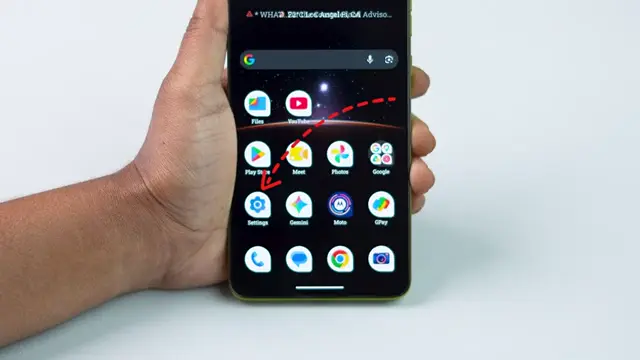
Step 1: Open Settings App
Start by launching the **Settings** app on your Android phone. This will give you access to various device settings, including notifications.
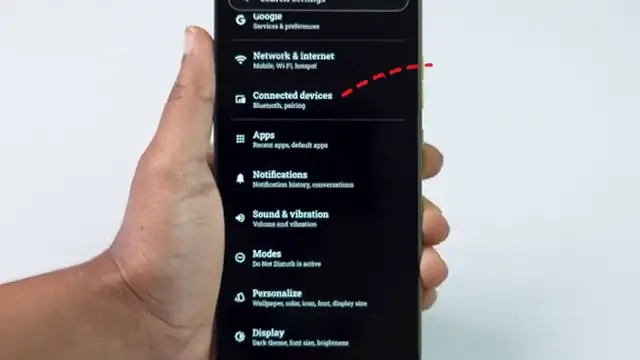
Step 2: Access Notifications
Scroll down and tap on the **Notifications** option. This section allows you to manage notification settings for all apps on your device.
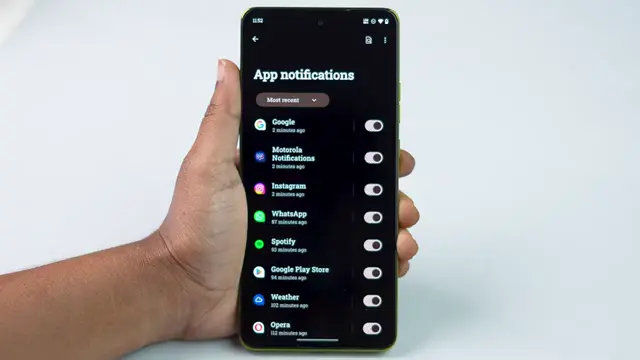
Step 3: Find Instagram in Apps
Look for **Instagram** in the list of apps and tap on it. This will take you to the specific notification settings for Instagram.
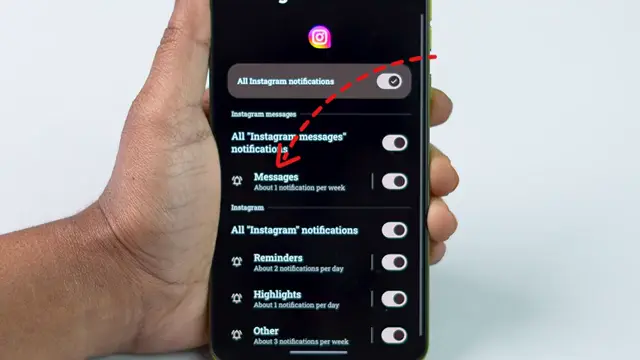
Step 4: Select Messages Notification Option
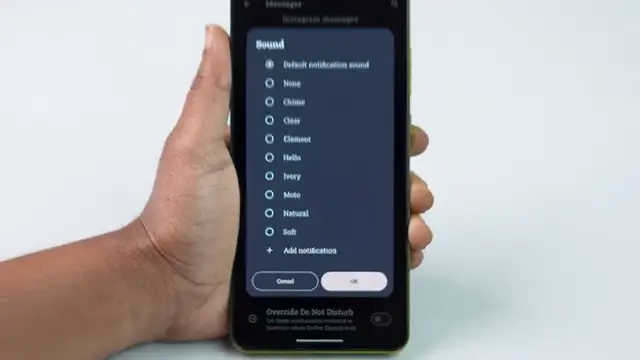
Tap on the **Messages** option to access the notification sound settings. This option specifically pertains to Instagram messaging alerts.
Step 5: Change Notification Sound
Scroll down to find the **Sound** option and tap on it. Browse through the list of available notification sounds and select one that you prefer. Once selected, confirm by tapping **OK** to save your changes. Your Instagram notification sound will now be changed!
Frequently Asked Questions
How do I change my Instagram notification settings?
Open the Instagram app, go to settings, select notifications, and customize your preferences.
Can I set a custom sound for Instagram notifications?
Yes, you can choose from the available sound options in your device settings.
Why can’t I hear my Instagram notification sound?
Ensure your phone is not on silent mode and that notification sounds are enabled in the app settings.
Will changing the notification sound affect other apps?
No, changing the notification sound for Instagram will only affect that app’s notifications.
Watch the Video Tutorial
Conclusion
By following these steps, you can easily change the notification sound for Instagram on your Android phone. Customize your alerts and enjoy a more personalized experience!
{“@context”:”https://schema.org”,”@graph”:[{“@type”:”HowTo”,”name”:”How to Change Instagram Notification Sound on Android”,”description”:”Learn how to change the Instagram notification sound on your Android phone with this easy guide. Customize your Instagram alerts today!”,”step”:[{“@type”:”HowToStep”,”position”:1,”name”:”Open Settings App”,”text”:”Start by launching the **Settings** app on your Android phone. This will give you access to various device settings, including notifications.”},{“@type”:”HowToStep”,”position”:2,”name”:”Access Notifications”,”text”:”Scroll down and tap on the **Notifications** option. This section allows you to manage notification settings for all apps on your device.”},{“@type”:”HowToStep”,”position”:3,”name”:”Find Instagram in Apps”,”text”:”Look for **Instagram** in the list of apps and tap on it. This will take you to the specific notification settings for Instagram.”},{“@type”:”HowToStep”,”position”:4,”name”:”Select Messages Notification Option”,”text”:”Tap on the **Messages** option to access the notification sound settings. This option specifically pertains to Instagram messaging alerts.”},{“@type”:”HowToStep”,”position”:5,”name”:”Change Notification Sound”,”text”:”Scroll down to find the **Sound** option and tap on it. Browse through the list of available notification sounds and select one that you prefer. Once selected, confirm by tapping **OK** to save your changes. Your Instagram notification sound will now be changed!”}]},{“@type”:”FAQPage”,”mainEntity”:[{“@type”:”Question”,”name”:”How do I change my Instagram notification settings?”,”acceptedAnswer”:{“@type”:”Answer”,”text”:”Open the Instagram app, go to settings, select notifications, and customize your preferences.”}},{“@type”:”Question”,”name”:”Can I set a custom sound for Instagram notifications?”,”acceptedAnswer”:{“@type”:”Answer”,”text”:”Yes, you can choose from the available sound options in your device settings.”}},{“@type”:”Question”,”name”:”Why can’t I hear my Instagram notification sound?”,”acceptedAnswer”:{“@type”:”Answer”,”text”:”Ensure your phone is not on silent mode and that notification sounds are enabled in the app settings.”}},{“@type”:”Question”,”name”:”Will changing the notification sound affect other apps?”,”acceptedAnswer”:{“@type”:”Answer”,”text”:”No, changing the notification sound for Instagram will only affect that app’s notifications.”}}]}]}

Leave a comment