
Key Takeaways:
- Steps to switch your Instagram account to private
- How to manage your followers and following list
- The benefits of keeping your account private
Many users want to maintain their privacy on social media platforms like Instagram. By default, your followers and following lists are public. However, you can easily hide this information by switching to a private account. This guide will walk you through the steps to protect your privacy while using Instagram.
Step 1: Understand Privacy Options on Instagram
To hide your followers and following list on Instagram, you’ll need to adjust your account settings. Instagram allows you to change your account type to provide more privacy options. This will help in limiting who can see your list, making your social media experience more personal.
Step 2: Access Settings on Instagram
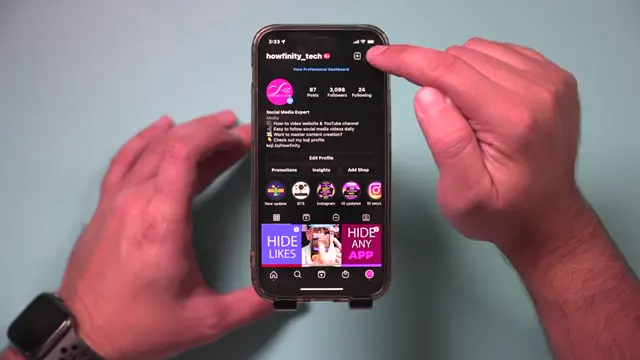
Open the Instagram app and tap on the three horizontal lines in the top-right corner of your profile page. This will provide a dropdown menu where you can find additional options such as settings and privacy.
Step 3: Change to a Private Account
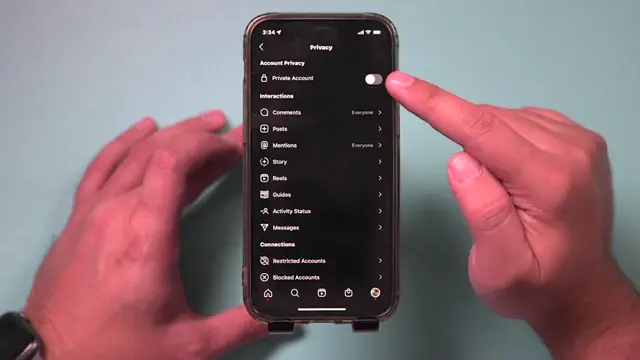
In the settings menu, go to Privacy and look for the Private Account option. Toggle this setting on to ensure that only your followers can see your following and followers. This step is crucial for hiding your lists from the public.
Step 4: Ensure You Have a Personal Account
Before switching to a private account, confirm that your account type is set to ‘Personal’. This ensures that you can access the private account feature, which is essential for hiding your following and followers list.
Step 5: Navigate to Account Settings
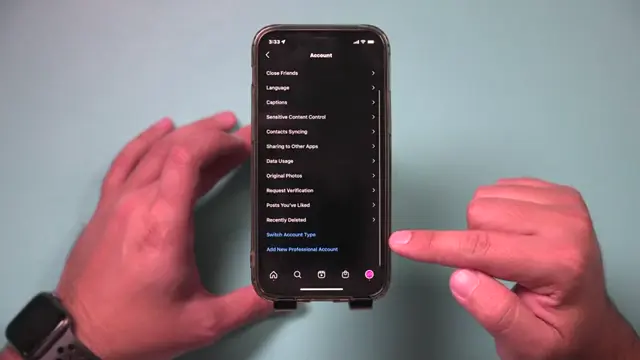
In the settings menu, select the ‘Accounts’ option. This is where you’ll find all account-related settings, including the option to change your account type.
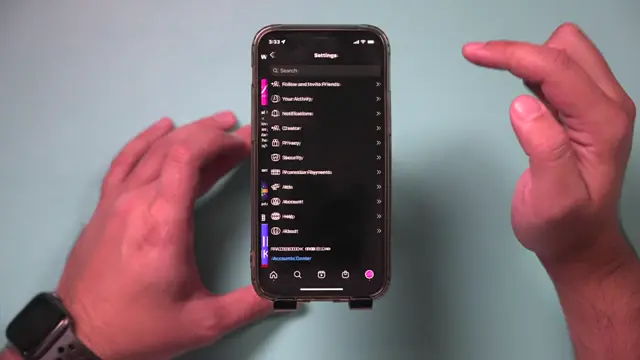
Step 6: Check Account Settings
Scroll to the bottom of the accounts settings to view your account type options. This is crucial for ensuring you have the right account type before making your account private.
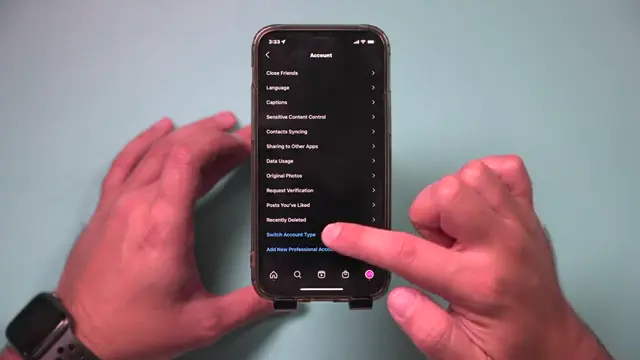
Step 7: Review Professional Options
If you are currently on a personal account, you’ll see options to switch to a professional account. Ensure that you remain on your personal account to use private account settings.
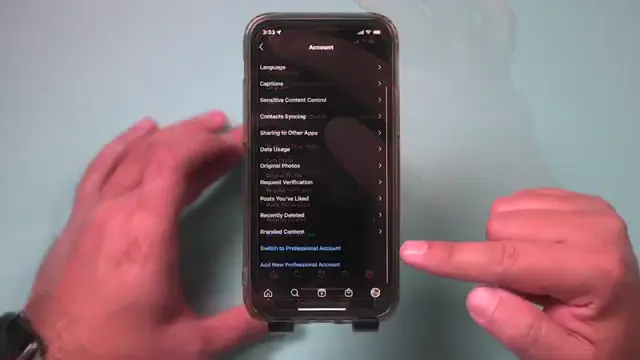
Step 8: Confirm Visibility Settings
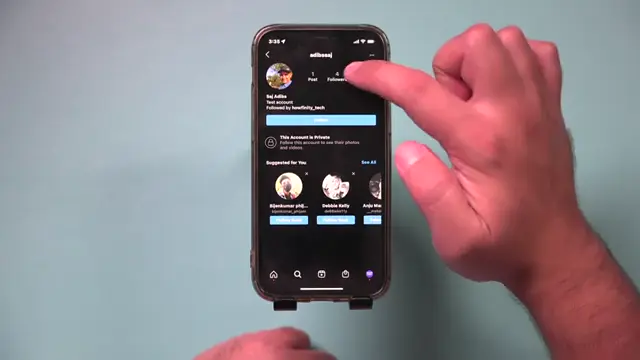
Check that you cannot see the following and followers list after switching to a private account. This confirms that your privacy settings are active.
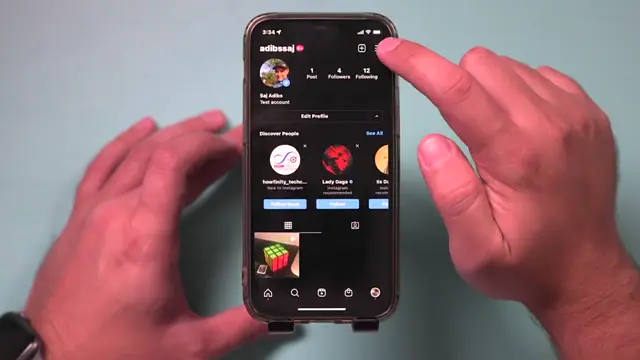
Step 9: Check Account Visibility
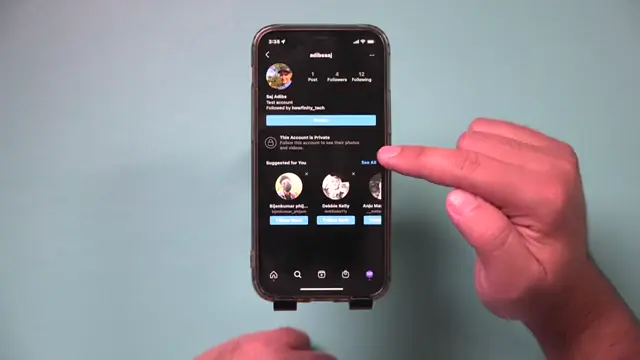
Log into a test account to ensure that your followers and following lists are hidden. Only approved followers should have access to this information.
Step 10: Understand Follower Requests
Remember, with a private account, new followers must send a request. You can approve or deny these requests from your followers, ensuring extra privacy.
Frequently Asked Questions
Will switching to a private account hide my posts?
No, switching to a private account only restricts who can see your followers and following lists, not your posts.
Can I switch back to a public account later?
Yes, you can switch back to a public account at any time through the same privacy settings.
What happens to pending follower requests?
When you switch to a private account, others will need to request to follow you, and you can approve or deny these requests.
Can my followers still see my likes and comments?
Yes, your followers can still see your activity on posts from accounts they follow, but they won’t see your followers and following list if your account is private.
Watch the Video Tutorial
Conclusion
By following these simple steps, you can easily hide your Instagram following and followers list. Maintaining privacy on social media is important, and using a private account is a straightforward way to achieve this.
{“@context”:”https://schema.org”,”@graph”:[{“@type”:”HowTo”,”name”:”How to Hide Instagram Following and Followers List”,”description”:”Learn how to hide your Instagram following and followers list by switching to a private account. Keep your account personal and secure!”,”step”:[{“@type”:”HowToStep”,”position”:1,”name”:”Understand Privacy Options on Instagram”,”text”:”To hide your followers and following list on Instagram, you’ll need to adjust your account settings. Instagram allows you to change your account type to provide more privacy options. This will help in limiting who can see your list, making your social media experience more personal.”},{“@type”:”HowToStep”,”position”:2,”name”:”Access Settings on Instagram”,”text”:”Open the Instagram app and tap on the three horizontal lines in the top-right corner of your profile page. This will provide a dropdown menu where you can find additional options such as settings and privacy.”},{“@type”:”HowToStep”,”position”:3,”name”:”Change to a Private Account”,”text”:”In the settings menu, go to Privacy and look for the Private Account option. Toggle this setting on to ensure that only your followers can see your following and followers. This step is crucial for hiding your lists from the public.”},{“@type”:”HowToStep”,”position”:4,”name”:”Ensure You Have a Personal Account”,”text”:”Before switching to a private account, confirm that your account type is set to ‘Personal’. This ensures that you can access the private account feature, which is essential for hiding your following and followers list.”},{“@type”:”HowToStep”,”position”:5,”name”:”Navigate to Account Settings”,”text”:”In the settings menu, select the ‘Accounts’ option. This is where you’ll find all account-related settings, including the option to change your account type.”},{“@type”:”HowToStep”,”position”:6,”name”:”Check Account Settings”,”text”:”Scroll to the bottom of the accounts settings to view your account type options. This is crucial for ensuring you have the right account type before making your account private.”},{“@type”:”HowToStep”,”position”:7,”name”:”Review Professional Options”,”text”:”If you are currently on a personal account, you’ll see options to switch to a professional account. Ensure that you remain on your personal account to use private account settings.”},{“@type”:”HowToStep”,”position”:8,”name”:”Confirm Visibility Settings”,”text”:”Check that you cannot see the following and followers list after switching to a private account. This confirms that your privacy settings are active.”},{“@type”:”HowToStep”,”position”:9,”name”:”Check Account Visibility”,”text”:”Log into a test account to ensure that your followers and following lists are hidden. Only approved followers should have access to this information.”},{“@type”:”HowToStep”,”position”:10,”name”:”Understand Follower Requests”,”text”:”Remember, with a private account, new followers must send a request. You can approve or deny these requests from your followers, ensuring extra privacy.”}]},{“@type”:”FAQPage”,”mainEntity”:[{“@type”:”Question”,”name”:”Will switching to a private account hide my posts?”,”acceptedAnswer”:{“@type”:”Answer”,”text”:”No, switching to a private account only restricts who can see your followers and following lists, not your posts.”}},{“@type”:”Question”,”name”:”Can I switch back to a public account later?”,”acceptedAnswer”:{“@type”:”Answer”,”text”:”Yes, you can switch back to a public account at any time through the same privacy settings.”}},{“@type”:”Question”,”name”:”What happens to pending follower requests?”,”acceptedAnswer”:{“@type”:”Answer”,”text”:”When you switch to a private account, others will need to request to follow you, and you can approve or deny these requests.”}},{“@type”:”Question”,”name”:”Can my followers still see my likes and comments?”,”acceptedAnswer”:{“@type”:”Answer”,”text”:”Yes, your followers can still see your activity on posts from accounts they follow, but they won’t see your followers and following list if your account is private.”}}]}]}



Leave a comment