
Key Takeaways:
- Learn how to add story highlights on Instagram.
- Understand the process to select and edit highlights.
- Discover how to manage your Instagram highlights effectively.
Adding Instagram story highlights to your profile is a great way to showcase memorable moments. This feature allows you to keep your stories visible beyond their usual 24-hour lifespan, making it easier for followers to see your best content. In this guide, we’ll walk you through the steps to create and manage your story highlights directly from the Instagram app.
Step 1: Access Your Instagram Profile
Open the Instagram app and navigate to your profile page located at the bottom right corner. This is where you’ll manage your highlights.

Step 2: Find the Plus Sign to Create Highlights
Look for the plus sign labeled ‘new’ on your profile. Tap it to begin creating a story highlight. If unavailable, check for a plus sign at the top of the page after updating the app.
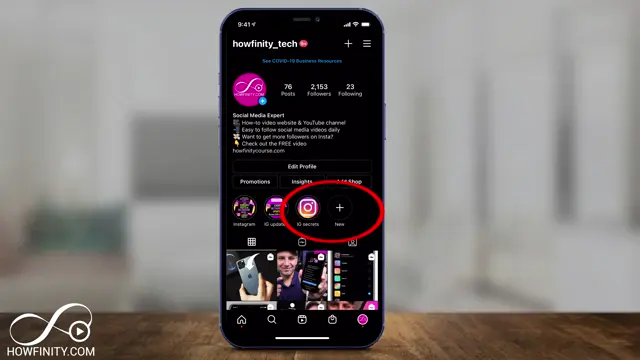
Step 3: Press Story Highlight
Once you tap the plus sign, select ‘story highlight’ to access your archived stories.

Step 4: Cancel the Process if Needed
If you need to exit out of the highlight selection, simply tap ‘cancel’ to go back.

Step 5: Select Stories for the Highlight
Choose the archived stories you wish to include in your highlight. Select multiple stories if desired and then tap ‘next’ to proceed.
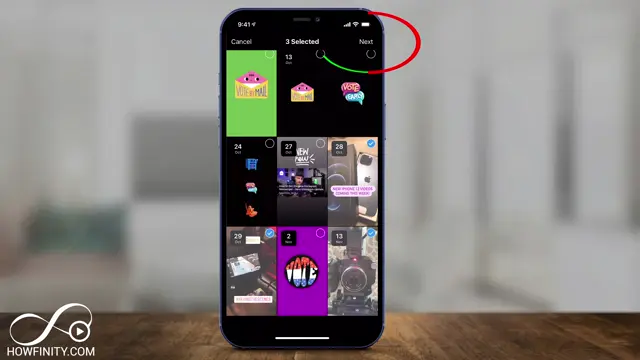
Step 6: Finalize Your Highlight Selection
After selecting your stories and customizing your highlight cover, tap ‘done’ to confirm your choices.

Step 7: Add the Highlight to Your Profile
Once you are satisfied with your title and cover, tap ‘add’ to officially create and add the highlight to your profile.

Step 8: Edit and Manage Highlights
To edit your highlights later, tap on any existing highlight, select ‘more’, and then choose ‘edit highlights’. This allows you to refine or add to your existing highlights.

Step 9: Access More Options for Highlights
When viewing your highlights, you can tap ‘more’ to see additional options such as editing or deleting highlights.
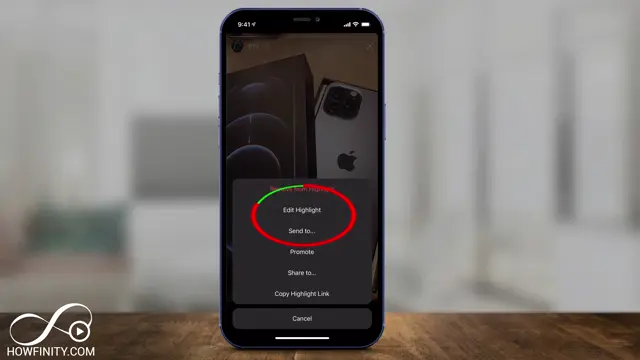
Step 10: Edit Highlights to Add or Remove Stories
Select the ‘edit highlights’ option to modify your existing highlights by adding or removing stories from them.

Frequently Asked Questions
What are Instagram story highlights?
Instagram story highlights are curated collections of your past Instagram stories that remain visible on your profile indefinitely.
How do I create story highlights?
To create story highlights, go to your profile, tap the plus sign, select archived stories, choose your favorites, and give them a title.
Can I edit my story highlights after creating them?
Yes, you can edit your story highlights at any time by selecting the highlight and using the edit option.
Is it possible to change the cover image of a highlight?
Absolutely! You can customize the cover image of your story highlight to match your branding or aesthetics.
Watch the Video Tutorial
Conclusion
Creating and managing Instagram story highlights is a simple process that can greatly enhance your profile’s visibility. Use these steps to keep your best stories accessible to your audience!








Leave a comment