
Key Takeaways:
- Learn how to add a link to your Instagram bio
- Discover the importance of directing followers to your link
- Understand how to update your Instagram profile
In this tutorial, we’ll show you how to add a clickable link to your Instagram bio. This feature is essential for directing your followers to your content, whether it’s a YouTube page or your website. By optimizing this single clickable URL, you can significantly increase your traffic and engagement on your Instagram posts. Follow the steps below to learn how to effectively manage your link bio for better visibility.
Step 1: Access Your Instagram Profile
Start by logging into your Instagram account and navigating to your profile. This is where you will be able to edit your bio and add your link. Simply tap on your profile picture at the bottom-right corner to open your profile.
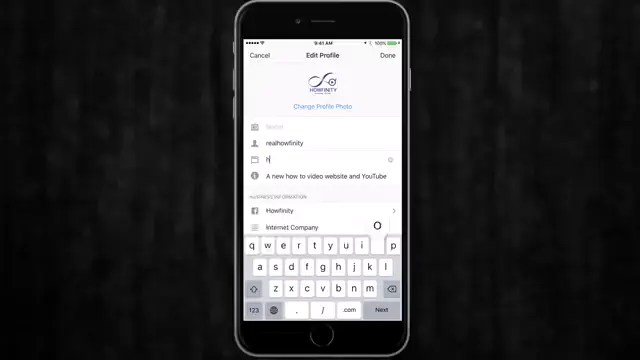
Step 2: Edit Your Profile
Once you are on your profile page, locate and click on the ‘Edit Profile’ button. This will allow you to access various fields where you can update your information, including the link area.
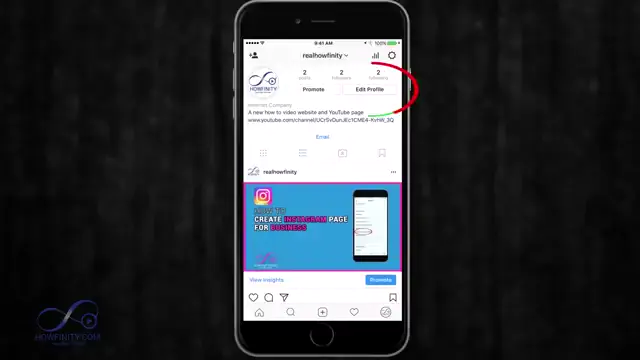
Step 3: Change Your Bio Link
In the Edit Profile section, find the ‘Website’ field, where you can input your desired link. You can replace the existing link with a new one, like your YouTube page or website URL, and then tap ‘Done’ to save the changes.
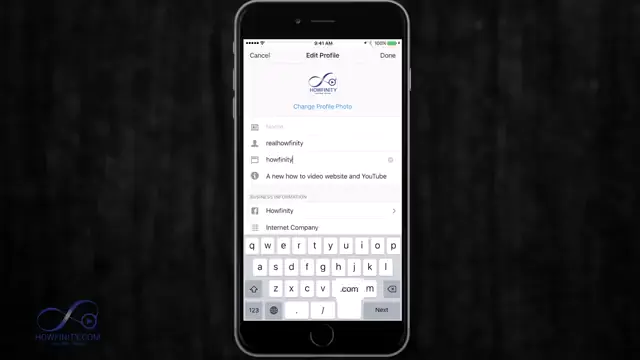
Step 4: Direct Followers to Your Link
Now that you’ve added a clickable link in your bio, you can direct your audience by mentioning it in your posts. For instance, in your post captions, use phrases like ‘Check out the link in my bio’ to guide your followers to click on your link.
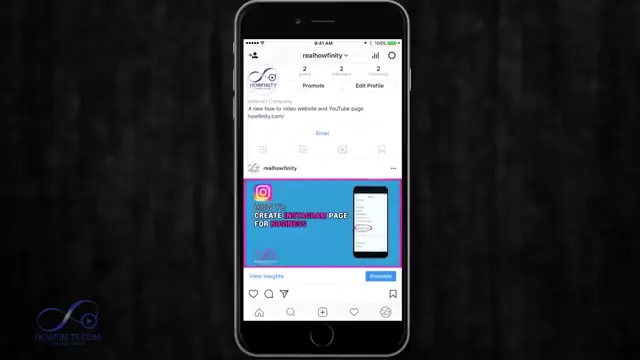
Frequently Asked Questions
Why can’t I add links in my Instagram posts?
Instagram only allows one clickable link in your bio to prevent spam. Links in post captions appear as plain text.
How do I change the link in my Instagram bio?
Go to your profile, click ‘Edit Profile’, and update the ‘Website’ field with your new link.
Can I add multiple links in my Instagram bio?
No, Instagram only allows one clickable link in the bio. You can use services like Linktree to create a single link that leads to multiple destinations.
How often should I update my Instagram bio link?
Update your link based on your posts to maximize traffic, especially when promoting specific content or features.
Watch the Video Tutorial
Conclusion
Adding a clickable link to your Instagram bio is a straightforward yet powerful way to drive traffic to your desired content. Update it regularly, and make sure to direct your followers to utilize this feature effectively.





Leave a comment