
Key Takeaways:
- Understand how to create a Gmail account without a phone number.
- Learn to navigate through the account creation steps.
- Know the options for setting recovery information.
Creating a Gmail account without a phone number can be important for those who prefer privacy or don’t have access to a phone. In this guide, we’ll walk you through the simple steps to successfully create your Gmail account without needing to enter a phone number. Follow the instructions below to ensure a hassle-free setup.
Step 1: Start the Account Creation Process
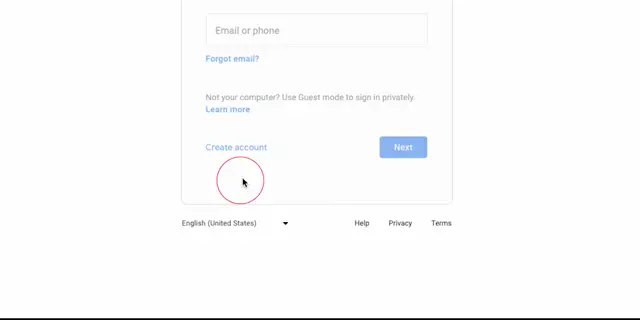
Open your Chrome browser and navigate to the Gmail sign-in page. Tap on ‘Sign in’ in the top right corner, and then select ‘Create account’. Choose ‘For myself’ in the next prompt for personal use.

Step 2: Enter Your Personal Details
Fill out your personal details, including your name and the Gmail address you want. You can either select a suggested address or create your own unique mail account.
Step 3: Skip the Phone Number Step
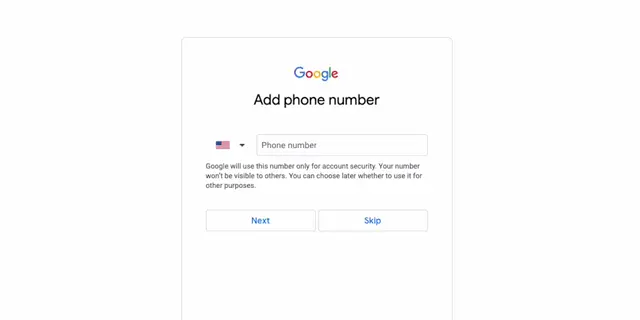
When prompted, you can choose to enter a phone number or skip this step. If you prefer not to give your phone number, simply click on ‘Skip’.
Step 4: Complete the Account Setup
Follow the remaining onscreen instructions to finalize your Gmail account setup. Make sure to set a strong password for your mail account.
Frequently Asked Questions
Is it possible to create a Gmail account without a phone number?
Yes, you can create a Gmail account without providing a phone number by selecting the ‘Skip’ option during the setup.
What information do I need to provide to create a Gmail account?
To create a Gmail account, you’ll typically need to provide your name, desired email address, and password.
Can I recover my Gmail account without a phone number?
Yes, you can still recover your account using recovery email or security questions if you do not provide a phone number.
Why might I want to skip entering a phone number?
You might want to skip entering your phone number for privacy concerns or if you do not have access to a phone.
Watch the Video Tutorial
Conclusion
By following these steps, you can easily create a Gmail account without a phone number. This approach gives you control over your privacy and allows you to use Gmail without the standard phone verification process.










Leave a comment